Damage Informer animat in stanga si dreapta tintei (respecta distanta si vizibilitatea nametag-ului de pe server).
Clean animated Damage Informer flanking your crosshair for SAMP, with zero background clutter and strict server nametag privacy.
1 / 2
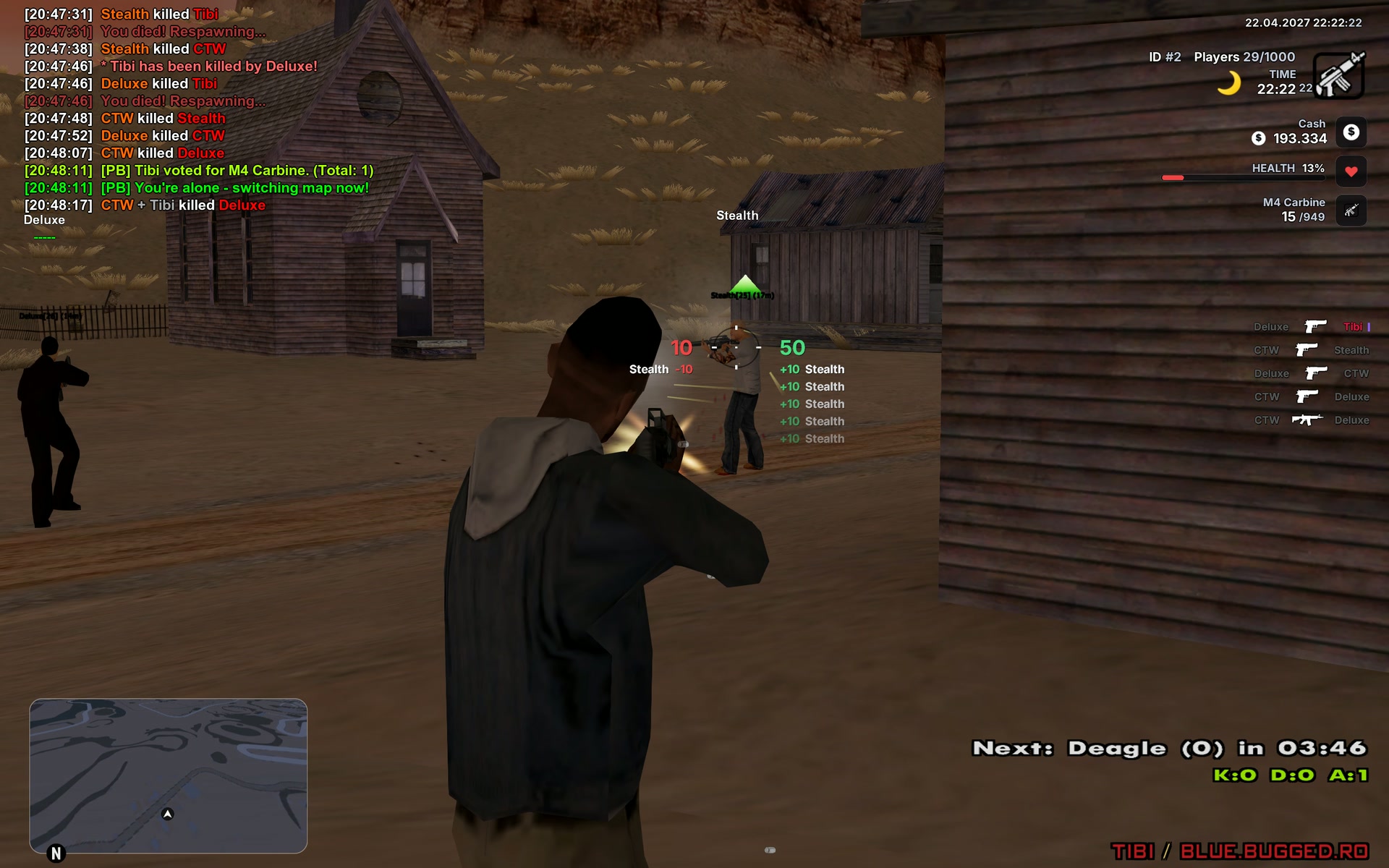
– Damage dat (verde, dreapta tintei) si damage primit (rosu, stanga).
– Respecta automat distanta si vizibilitatea nametag-ului de pe server (nu arata numele la Hunger Games, Hitman undercover, admini ascunsi sau peste distanta serverului).
– Functioneaza cu toate armele (Deagle, M4, AK, Sniper, Shotgun, melee etc.), plus hitmarker subtil si sunet discret la impact.
–
/mods sau /dmginf – setari extra.
Instalare mod Damage Informer
-
1
Acest mod are nevoie de CLEO (ASI Loader) instalat in joc.
-
2
Extrage arhiva descarcata si pune fisierele (DamageInformer.asi, DamageInformer.ini) direct in folderul principal al jocului 📁GTA San Andreas, acolo de unde deschizi samp.exe.
Daca modul nu porneste sau cere DirectX 9, descarca d3dx9_43.dll si pune-l in folderul principal al jocului. -
3
Intra in joc — modul este activ automat. Poti scrie
/dmginfin chat pentru a-l opri sau porni.
Update v1.0 (28.11.2026): prima versiune.
Autor mod: Tibi (moduri.ro) v1.0
– Damage dealt (mint, right of crosshair) and damage taken (red, left of crosshair), with a bold running combo total on top and smooth per-hit feed underneath.
– Strictly respects server nametag visibility and draw distance (never leaks names in Hunger Games, undercover Hitman, hidden staff, or beyond server nametag distance).
– Works with all weapons (Deagle, M4, AK, Sniper, Shotgun, melee, etc.), plus subtle crosshair hitmarker and hit tick sound.
–
– Strictly respects server nametag visibility and draw distance (never leaks names in Hunger Games, undercover Hitman, hidden staff, or beyond server nametag distance).
– Works with all weapons (Deagle, M4, AK, Sniper, Shotgun, melee, etc.), plus subtle crosshair hitmarker and hit tick sound.
–
/dmginf – quick toggle in-game (extra options in DamageInformer.ini).
How to install Damage Informer
-
1
This mod requires CLEO (ASI Loader) installed in your game.
-
2
Extract the archive and copy the files (DamageInformer.asi, DamageInformer.ini) directly into your main 📁GTA San Andreas folder (where samp.exe is).
If the mod doesn’t load or asks for DirectX 9, download d3dx9_43.dll and place it in your main GTA SA folder. -
3
Launch the game — it’s active automatically. Type
/dmginfin chat to toggle it on/off.
Update v1.0 (28.11.2026): initial release.
Mod author: Tibi (moduri.ro) v1.0