Un mod modern de minimap 3D in stil GTA 6 pentru GTA San Andreas si SAMP, cu GPS catre checkpoint (/find, /where, etc.) cu harta care se schimba pe Zi/Noapte (ca in GTA 6).
A modern 3D GTA 6-style minimap mod for GTA San Andreas & SAMP, with automatic GPS routing to your checkpoint (/find, /where, etc.) and a map that switches between Day/Night automatically (just like GTA 6).
1 / 2
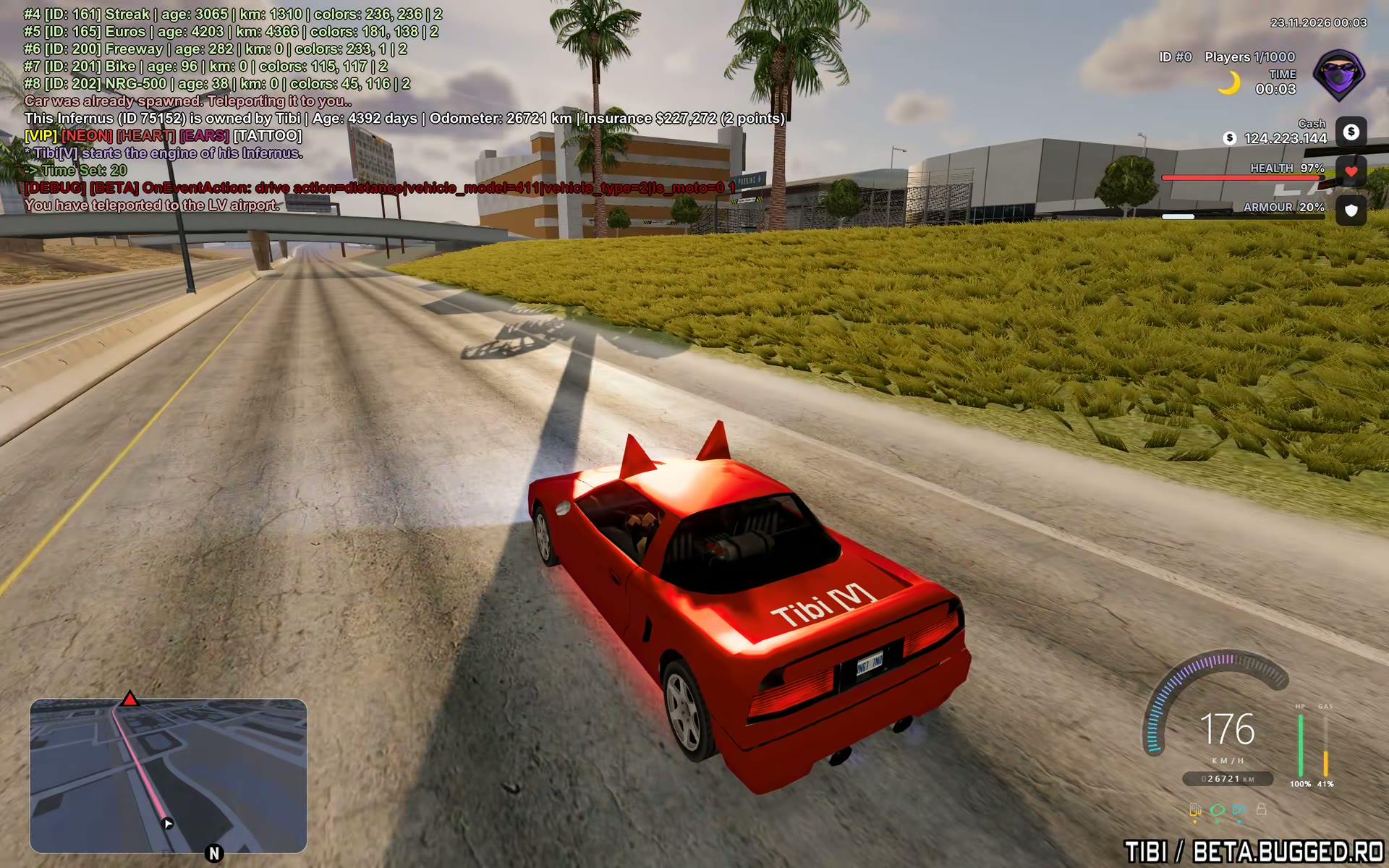
– Vine setat din start pe stilul GTA 6 (harta 3D inclinata + schimbare automata Zi / Noapte dupa ora din joc).
– GPS automat integrat pe minimap care iti traseaza ruta pana la waypoint sau checkpoint.
– 4 forme si 6 stiluri de harta la alegere: GTA 6, Circle (Definitive), Square, Rectangle + mod 2D/3D.
– Meniu de setari direct in joc cu comanda /minimap (sau /mods) pentru dimensiune, pozitie, transparenta, etc.
– Acesta modifica doar minimap-ul (partea din stanga jos).
Daca vrei si HUD-ul (partea din dreapta sus), il poti lua de aici: moduri.ro/hud6
Instalare mod Minimap GTA 6
-
1
Acest mod are nevoie de CLEO (ASI Loader) instalat in joc.
-
2
Extrage arhiva descarcata si pune fisierele (DefinitiveMinimap.asi, DefinitiveMinimap.ini, Inter.ttf si folderul DefinitiveMinimap) direct in folderul principal al jocului 📁GTA San Andreas, acolo de unde deschizi samp.exe.
Daca modul nu porneste sau cere DirectX 9, descarca d3dx9_43.dll si pune-l in folderul principal al jocului. -
3
Intra in joc si scrie /minimap in chat daca vrei sa schimbi forma, harta, dimensiunea sau pozitia.
Update v1.0 (23.11.2026): prima versiune.
Autor mod: Tibi (moduri.ro) v1.0
– Set to the GTA 6 style out of the box (tilted 3D radar + automatic Day / Night map switching based on in-game time).
– Built-in automatic GPS on the minimap that draws the route to your waypoint or server checkpoint.
– 4 shapes and 6 map styles to choose from: GTA 6, Circle (Definitive), Square, Rectangle + 2D/3D mode.
– In-game settings menu via /minimap (or /mods) for size, position, opacity, border, and blip scale, auto-saved to .ini.
– This mod only changes the minimap (bottom-left).
If you also want the GTA 6 HUD (top-right), you can get it here: moduri.ro/hud6
How to install GTA 6 Minimap
-
1
This mod requires CLEO (ASI Loader) installed in your game.
-
2
Extract the archive and copy the files (DefinitiveMinimap.asi, DefinitiveMinimap.ini, Inter.ttf, and the DefinitiveMinimap folder) directly into your main 📁GTA San Andreas folder (where samp.exe is).
If the mod doesn’t load or asks for DirectX 9, download d3dx9_43.dll and place it in your main GTA SA folder. -
3
Launch the game and type /minimap in chat if you want to change the shape, map style, size, or position.
Update v1.0 (23.11.2026): initial release.
Mod author: Tibi (moduri.ro) v1.0